A familiar handoff
Use your usual email account. Tell your PA what you need and what a useful result looks like.
YOUR PERSONAL ASSISTANT HAS AN EMAIL ADDRESS
Send the task. Get the work back.
Your AI personal assistant, by email.
No new app to learn. No dashboard to check. Just email.
FAMILIAR FROM THE FIRST EMAIL
Your inbox already knows how to have a conversation.
Now it has someone to help.
Leave your name and email. Your signup joins our secure onboarding queue.
When invited, get your own assistant email address. Save it as a contact.
Write naturally. Include the details and what a good result looks like.
Receive the result in your email conversation. Review it, reply, and keep a useful copy.
SMALL TASKS. REAL RELIEF.
The draft you’re avoiding. The notes that need order. The decision that needs a second look.
“Can you make this email clearer and friendlier? Keep it short. Here’s my draft…”
Absolutely. Paste your draft and I’ll polish it while keeping your voice.
Illustrative text requests. Your beta invitation confirms supported tasks and limits.
THE IDEA, IN MOTION
Some work is best discussed live.
Other work is better handed over.
Illustrative brand films, not recordings of live customer jobs. Beta tasks and file support are confirmed in your invitation; signup does not activate a PA.
A woman sends a project document from her laptop, continues her day, and checks a reply on her phone.
USEFUL BEYOND THE NEXT REPLY
Ordinary answers already delivered to your mailbox stay in the correspondence you keep. Save, search or forward your received copies using the email tools you know.
Use your usual email account. Tell your PA what you need and what a useful result looks like.
When a supported task returns an attached file, download and archive the actual file. Hosted links can have separate access and expiry limits.
Choose what to share, review important results, and keep control of consequential decisions.
THE BIGGER PICTURE
A familiar way to delegate useful work—and a longer-term vision for follow-through and selected personal history.
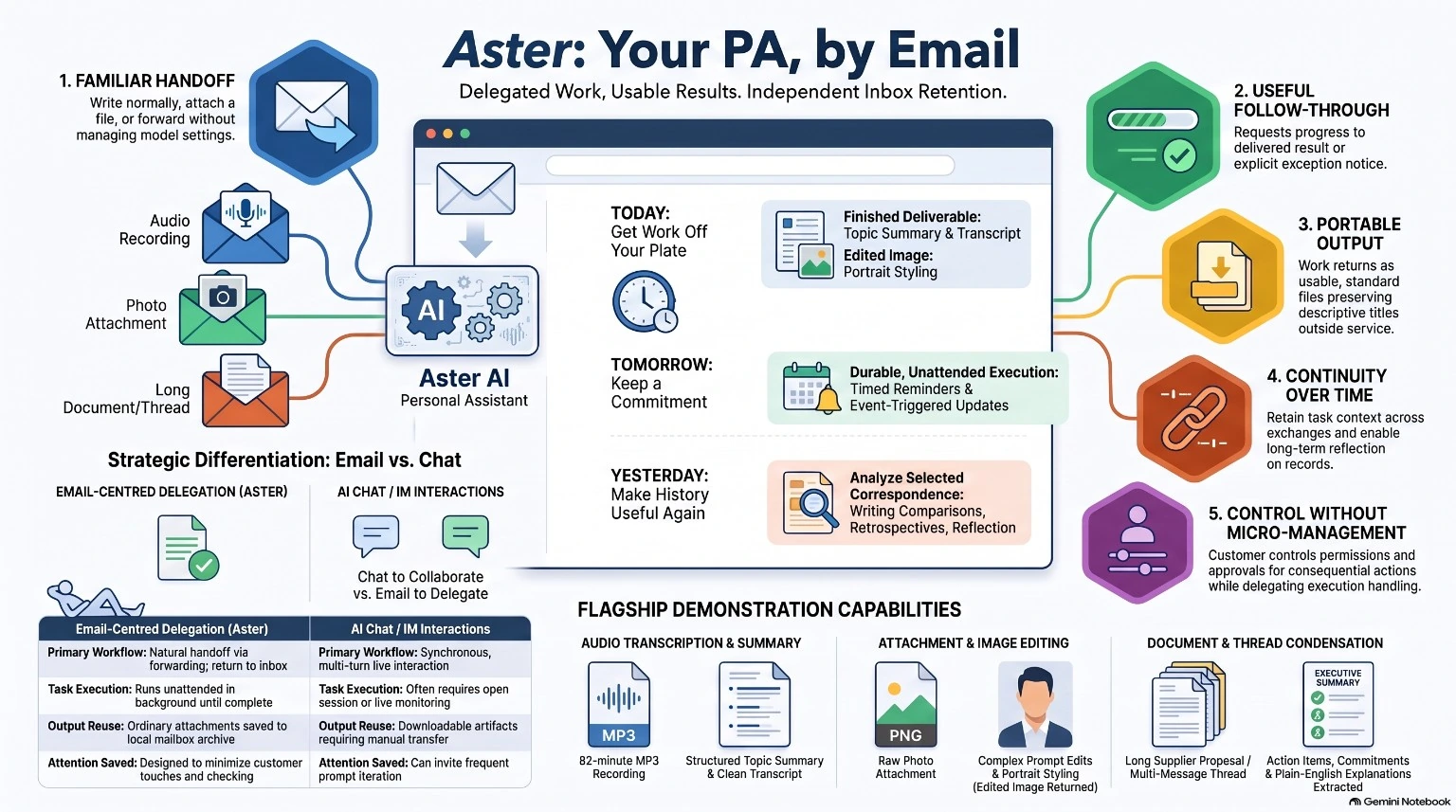
Demonstrated in bounded pilotsWriting and email replies, an assisted recording-to-transcript workflow, and a returned image edit. These examples do not establish general availability or guaranteed turnaround.
Still being developed and evaluatedReminders, event-based follow-through and reflection on selected old correspondence. The infographic describes the wider vision; your invitation defines your available beta tasks.
HELPFUL, WITH BOUNDARIES
Hand off the thinking and drafting. Keep control of the decisions that matter.
AI can make mistakes. Review important answers before relying on them. Don’t email passwords or highly sensitive information.
EARLY ACCESS
Join the early-access list.
We’re starting small and learning from real tasks.
A FEW GOOD QUESTIONS
No. Once you’re invited to the beta, you’ll receive a dedicated PA email address. Use the email app you already have and reply in the same conversation.
Start with writing, editing, comparisons and organizing text you provide. Recording transcription and image editing have been demonstrated in bounded pilots; they are not blanket promises for every account or file. Your invitation confirms supported tasks, formats and limits. Reminders, connected actions and archive reflection are not general beta promises.
No. Purchases, financial commitments, account changes, data deletion and credential disclosure are unavailable in this beta. Future consequential actions will need explicit approval and appropriate safeguards.
We save your name, email and consent for onboarding. A signup is an early-access request, not an activated PA. Invitations depend on readiness and capacity. You receive a PA address only after activation succeeds; saving your request does not mean a welcome email has been sent.
We use your signup details to review your beta request and contact you about onboarding. Don’t include passwords or sensitive documents in the form. During the beta, requests sent to your PA are processed by our email and AI service providers.
Chat can be great for live exploration and quick iteration. Aster is designed for supported work you want to hand over and receive back in your correspondence. Use whichever fits the task.
You can retain ordinary answers and actual files already delivered to your mailbox under your own email and backup arrangements. A link is not a downloaded file: hosted outputs may have separate access and expiry limits. This does not transfer Aster’s internal memory or pending jobs.
The films illustrate the experience, and the infographic presents the wider product vision. They are not live performance tests. Scheduling and historical-email reflection remain under evaluation; available beta capabilities are confirmed with your invitation.